


ColdBet APK: Make Your Gaming Experience Convenient
ColdBet APK is an application for mobile devices. It opens access to our service. Here you can place bets on sports. Other gambling entertainments are also available. By downloading the ColdBet apk, you get a mobile version of our site. The application is adapted for smartphones and tablets. This reliable and easy way to bet at any time. No need to log into your browser every time. We strive to make your experience comfortable. Our app is your personal access to ColdBet.
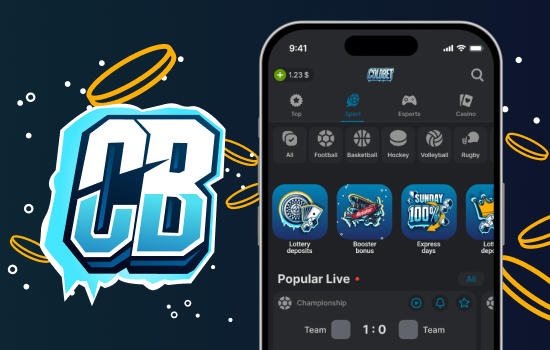
ColdBet Mobile App
How is our app better than the website?
- 🏎️ The app works faster than a mobile browser. You save time on loading pages.
- 📲 Notifications come directly to your phone. You are always aware of important events. For example, match results or new promotions.
- 👣 Access to functions takes fewer steps. You do not need to enter a ColdBet apk login every time. The application remembers your login details. This is very convenient for a quick start.
- 👀 The ColdBet app interface is simple. We tried to make it clear at first glance. The buttons and menus are logically located. You will quickly find the section you need.
- 🧭 Navigation is intuitive. The main sections of sports and casino are always in plain sight.
- 👤 Your personal account opens in a couple of clicks.
- 🎰 The betting process has become as straightforward as possible. You will easily understand how to place a bet. We do not have complex menus or unnecessary elements. Everything is done for your convenience.
Application works stably on most devices. We update it regularly to improve it. Want to try it? Start with ColdBet apk download.
Where to download and how to install ColdBet APK on Android
Want to use ColdBet directly from your phone? Our app gives you access to everything. Downloading and installing the ColdBet APK on Android is easy. Here’s how to do it.
Before installing the application:
- ⚙️ Go to your phone’s Settings.
- 🔏 Find a section that may be called “Security,” “Apps,” or “Privacy.”
- 👤 Inside this section, find an item similar to “Installing unknown applications” or “Unknown sources”.
- 🌐 Select the browser you are using (e.g. Chrome or Samsung Internet) and enable permission to install from unknown sources for it. Don’t worry, it is safe when you download APK from our official website.
Now go to our official ColdBet website:
- 1️⃣ Find the link for ColdBet app apk download on the main page or in a special section for mobile users.
- 2️⃣ Click on it to start downloading the APK file. Wait for the download to complete.
- 3️⃣ After that, open the Downloads folder on your device or look for the notification that the download is complete.
- 4️⃣ Find a file with a name similar to ColdBet.apk. Click on it.
- 5️⃣ The installation screen will appear. Click the “Install” button.
- 6️⃣ The system may ask you to confirm the permissions that the application requests. Confirm them.
- 7️⃣ Wait for the installation to complete. You will see the message “The application has been installed”.
- 8️⃣ Open ColdBet apps from your home screen or apps menu.
Done! Now you can place bets or play through our convenient application. The ColdBet download apk process has been completed successfully.
System requirements and compatibility
We have made the application available for most Android phones. To install ColdBet apk, your device needs meet simple conditions.
| Requirement | Minimum value | Recommended value |
| 🆕 Android version | 5.0 (Lollipop) | 10.0 (Q) or later |
| 🗑️ Free memory | 100 MB | 200 MB |
| 🏭 Processor | Any | Modern 4-core |
| 🌐 Internet connection | Stable | High speed |
Old phones will also run the application, but on modern ones it works faster and smoother. Check if there is enough space not only for installation, but also for operation. Regularly update the application via ColdBet apk download latest version – this improves stability. Good internet will make your game more comfortable. We strive to make ColdBet available to everyone.
Features of our application
We made ColdBet for your convenience.By downloading our application, you get:
- 📱 Access sports betting directly from your phone. Choose events before they start or follow the game in real time and place Live bets. It’s simple and clear.
- 🎰 We also have something to offer for gambling enthusiasts. The application contains various slot machines and other casino games. You can easily find something to your liking to relax and try your luck.
- 💵 We understand how important we are to you fast and secure payments. Therefore, the application offers various methods of replenishing the account and withdrawing funds. The security of your transactions and data is something that we ensure at all times. You can rest assured.
- 🎁 Especially for those who use Android, we have prepared nice bonuses. Once you install the app, you can find special offers that are only available on this platform.
To get the app, run ColdBet app download apk.
Strengths and Weaknesses of APK
ColdBet application aims to be convenient for everyone. It works quickly, even with not the best internet. The interface is clear, easy to understand. We regularly improving stability of work.
Like any application, ours may have some peculiarities. Sometimes when installing APK outside of official stores, you need to allow installation from unknown sources in the phone settings. This is a standard Android security measure. We always recommend downloading only the latest version from our official website to avoid any complications. Search for ColdBet apk latest version.
Compared to other apps, we try to keep the focus on simplicity and reliability. It is important to us that you can place bets or play without unnecessary complications. We do not overload the interface, making it clear at first glance.
Summing up
Want to place bets conveniently? Download ColdBet APK from our website. It’s simple: main events, clear interface, easy account management. Check results and withdraw winnings directly in the application. Try it – you’ll like it. We are constantly improving ColdBet APK for your convenience. See for yourself, download it today.
Frequently Asked Questions (FAQ)
Is the ColdBet app free?
Yes, completely. Download and use without payment.
How to update ColdBet?
We are releasing new versions. Just download the latest ColdBet APK from the website and install. Your data will remain.
One account on the website and in the app?
Yes, your account works the same everywhere. Log in with the same data, balance and history are synchronized.
The app is not working?
Check your internet connection. Make sure you have the latest version of ColdBet APK. Try rebooting your phone. If that doesn't help, write to support, we'll help.
Is ColdBet legal in my country?
This depends on local laws. Please check the rules in your region. Play responsibly.